Welcome to NETO

Log in to your account, or sign up in a minute.

Already registered?Existing clients
New here? Sign upChoose your track Employer Employee / Freelancer

Get in touch

Pick whatever works for you · we're here.

Info & policies

Everything about NETO · transparent and available

NETO · Bareket I.T. Ltd.
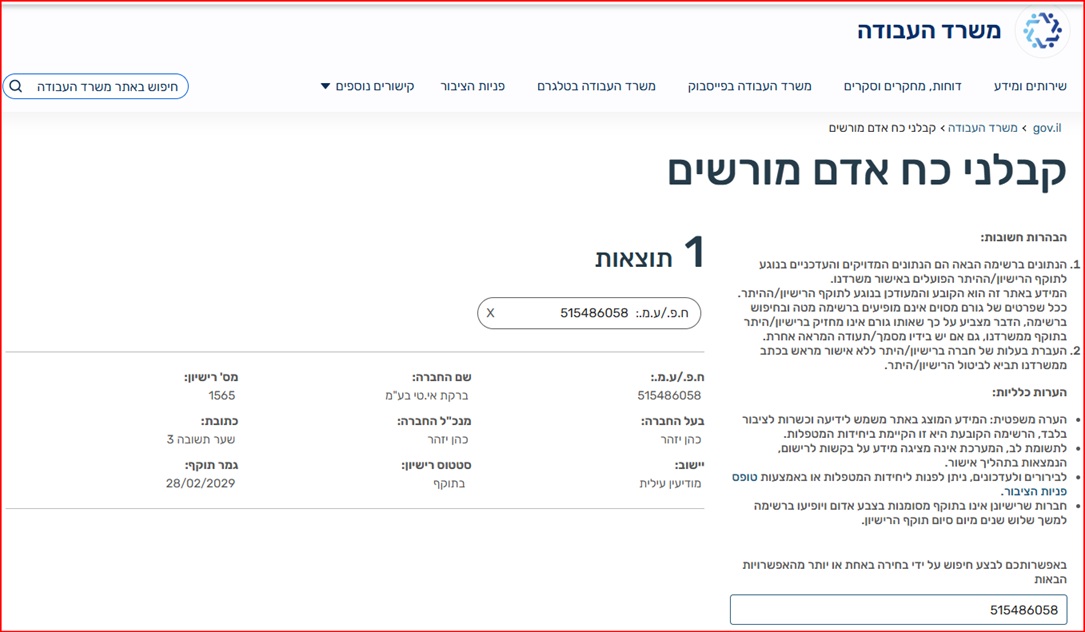
Reg. 515486058 · Licensed manpower contractor #1565 (valid to 28.02.2029)
Licensed private employment bureau #2435 (valid to 30.11.2027) · verify in the Ministry of Labor registry
Office: Sha'arei Teshuva 31, Modi'in Illit
Tel +972-8-976-1874 · neto@neto.work

Open →

Book a demo

Pick a convenient time · we'll confirm by phone/email

Choose a day
Choose a time (11:30–15:30)
Guide progress0%
System Guides · Job Seeker Guide

Looking for a Job? Here Is How to Find One Through NETO

Build your profile once · and the jobs come to you. Define your fields, availability and area, review your personalized job feed and apply in one click. Seven simple steps · completely free for job seekers.

Let's Start · Step 1
Manpower license no. 1565 Ministry of Labor supervision Free for job seekers
AI Summary · the guide in half a minute
  • What it is: Job searching through the NETO system · build a profile, and matching jobs arrive in your feed. Completely free for job seekers.
  • What you do: Upload a CV (PDF recommended), define work fields and roles with hourly salary expectations, mark availability and shifts on a timeline, and choose search areas on the map · including a remote-work option.
  • How you apply: Review the personalized job feed, filter by keywords, open a job for the full details and click Apply · stating salary expectations and attaching recommendations from previous employers.
  • What you get: Employers searching for workers in your area find you, your application goes directly to the employer, and accumulating ratings and recommendations strengthen your profile.
  • Got hired? Continue to the Worker Guide · Form 101, bank details and a payslip with full rights. Sources: Israeli Ministry of Labor.
1
Step 1 of 7

Enter the Job Search Process

On the dashboard click the Job Search card. The Job Offers tab in the side menu centralizes all the steps: open positions, CV, work fields, availability, search areas and ratings.

Good to know: The dashboard already shows how many employers searched for workers with a profile like yours · the fuller your profile, the more you get found.
Step 1 · The dashboard with the job search card in the NETO system
2
Step 2 of 7

Fill In Your CV and Profile

In the CV tab upload a resume file (PDF, Word or image · PDF recommended) and fill in your details: full name, mobile phone and email. This is the public profile employers see.

Good to know: The optional "tell us about yourself" part (languages and their level, age, military/national service) improves your matches · worth filling in. Save at the end · and the system confirms the profile was saved.
Step 2 · The CV and public worker profile screen in the NETO system
3
Step 3 of 7

Define Work Fields and Roles

In the Work Fields tab choose a field and a role (a role can be chosen without a field too), mark the position type · permanent and/or temporary/part-time · and fill in years of experience and hourly salary expectations.

Good to know: You can define several roles in parallel · each with its own expectations. Prefer not to get an email for every new position? Tick the mailing opt-out at the top.
Step 3 · Defining work fields and roles with salary expectations in the NETO system
4
Step 4 of 7

Set Availability and Shifts

In the Availability tab set the date you can start a permanent position, and for temporary/part-time work · a date range and the convenient hours for each day, by dragging on the timeline.

Good to know: You can add several shifts on the same day (say morning and evening) with the Add Shift button · making the job matching more precise.
Step 4 · Setting availability and shifts on the timeline in the NETO system
5
Step 5 of 7

Set Search Areas

In the Search Areas tab type a locality and choose a radius in kilometers · or the whole country. The map shows how many employers are active in the area you defined, and several areas can be added.

Good to know: Looking for remote work? Tick "remote / work from home" · and such positions will enter your feed as well.
Step 5 · Setting search areas on a map with a radius and the number of employers in the area
6
Step 6 of 7

Review the Job Feed · and Apply

The Open Positions tab holds the feed of jobs matching your settings: position number, role, hours, date and location. Filter by keywords, open a job to see the full details · description, days and hours, address with a map and the employer profile · and click Apply.

Good to know: Before sending you can state gross monthly salary expectations (recommended · saves irrelevant approaches) and attach recommendations from previous employers. Not a fit? Click "No, thanks" and the position leaves your feed.
Step 6 · The job feed matching the search settings in the NETO system
7
Step 7 of 7

Build Ratings and Recommendations

The Rating and Recommendations tab shows your professional rating and what other employers say about you · the recommendations you attached and employer ratings appear alongside your profile.

Good to know: Accumulating ratings and recommendations are your biggest advantage in the system · employers see them before the interview. Worth attaching recommendations with your very first application.
Step 7 · The professional rating and employer recommendations screen in the NETO system

Related Guides · Where to Next

Job Seeker FAQ

How much does job searching through NETO cost?
Nothing. Registration, building your profile, the job feed and applying are completely free for job seekers.
How does the system know which jobs to offer me?
Based on what you defined: work fields and roles, availability and shifts, search areas and salary expectations. The more complete and accurate your profile · the better the matches, and employers searching for workers in your area can find you too.
Do I have to upload a CV?
Highly recommended (PDF preferred) · that is what the employer sees. Even without a file, the profile you fill in serves as your business card: details, languages, experience and recommendations.
Should I state salary expectations?
Yes. Stating salary expectations saves approaches for positions that do not match · and employers value knowing candidates' expectations in advance when deciding whom to interview.
What happens after I apply?
Your application is sent directly to the employer, together with your profile, CV and the recommendations you attached. If the employer is interested · they get back to you, while matching offers keep arriving in your feed.
I got the job · what now?
Continue to the Worker Guide: Form 101, bank details, signing the employment agreement and reporting attendance. NETO is the official employer, under manpower contractor license no. 1565 · and you receive a payslip with full rights.

Summary · The Whole Process in Seven Lines

  1. Enter the Job Search card on the dashboard.
  2. Upload a CV (PDF recommended) and fill in your profile.
  3. Define work fields, roles and hourly salary expectations.
  4. Mark availability and shifts on the timeline.
  5. Choose search areas on the map · or remote work.
  6. Review your personalized feed, open a job · and apply.
  7. Ratings and recommendations accumulate · and employers find you.

The same board appears here on the site and inside the system · identical jobs, two ways to work with them. Searching and your profile are entirely free and need no request to us: leave a short profile that employers see, or tell us exactly what you are looking for · field, area and pay range · and we let you know the moment such a job opens.

Nothing to wait for · you can start now

The job board and your profile are free and require no request to us. Two ways in: a short profile employers can see, or a standing request describing what you are after · and we tell you when a matching job opens.

About this guide: Written by the NETO team, led by Izhar Cohen, founder of NETO (Net For Life Ltd) · manpower contractor license no. 1565 · operating since 2016. Screenshots are from the NETO.LIVE system. Last updated: 02 Sep 2026.
About the author
Yizhar CohenYC
Yizhar CohenEntrepreneur · CEO and Founding Partner at NETO

I founded NETO to turn complex employment and payment processes into something simple, clear and legal for everyone. Good service starts with human understanding, combined with smart technology and personal attention.

Connect on LinkedIn
Have a question? Let's talk.
Topics