English invoice for a foreign clientBill a client abroad in English without opening a business file · NETO helps Israeli freelancers organise the payment route, issue proper documents and keep a clean audit trail
You found the client abroad and the work is ready to start · but opening and managing a separate business file just to send one invoice is slow and rarely worth it. NETO helps you map the engagement, choose a documented payment route and prepare an English document the foreign client can actually use, so you get paid without risky assumptions about tax or classification.

AI summary · English invoice for a foreign clientClick to read the page summary
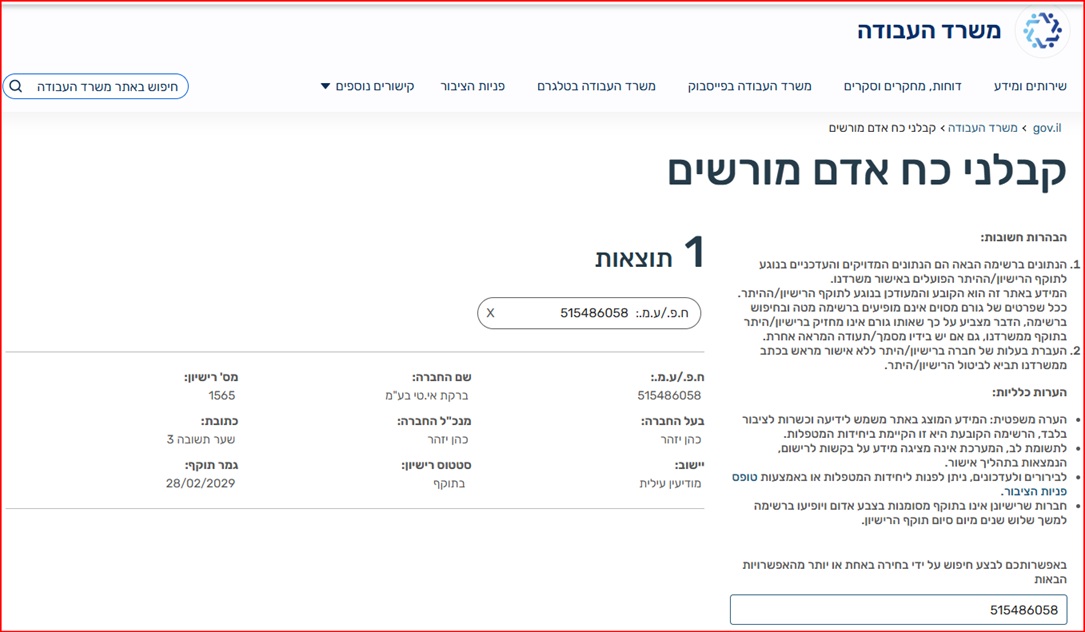
Israeli freelancers can issue an English invoice for a foreign client, and this guide covers the payment route, the documents and the VAT checks to make before issuing. It stresses checking your status carefully rather than making risky assumptions about what is required. A quick decision table helps you pick the right route. NETO supports the workflow so you can bill a foreign client without opening a business file, with the fee taken from the client invoice. NETO operates under manpower contractor license 1565 (Bareket I.T Ltd, company id 515486058).
An English invoice for a foreign client · the essentials
An English invoice for a foreign client should include the client's legal name, address, service description, currency, payment terms and the correct Israeli documentation route. In some cases, a freelancer can work through a structured payment service instead of opening and managing a separate business file · but this depends on the facts: whether the work is one-time or ongoing, who controls the work, where the client is located, what tax documentation is required and whether the payment path is suitable.
NETO helps Israeli freelancers and companies organise the payment flow, issue proper documents where relevant and keep a clear audit trail. This page is general information, not tax or legal advice · the actual VAT and reporting treatment must be checked according to the applicable rules and the specific transaction.
NETO operates in Israel under manpower contractor license 1565 issued by the Israeli Ministry of Labor. For employers and freelancers, this supports a documented payment route, subject to reviewing the actual work relationship, the tax position and the required documents before work begins.
What to check before issuing documents in English
A few checks up front prevent payment disputes later. For an international client, a clean payment route is often as important as the invoice wording itself.
Client identity
Use the foreign client's full legal name, address, country and contact details. This prevents payment disputes and helps match the invoice or payment document to the client's procurement process.
Payment route
Confirm the currency, the bank details, the payment date and who absorbs the transfer costs. For international clients, a clean payment route is often as important as the invoice wording itself.
Compliance status
Check whether this is a freelance service, payroll-like work, a recurring engagement or a one-time project. The right classification shapes which documents and which route actually fit.
Documentation trail
Keep the agreement, the scope, the approvals, the invoice or payment document and the proof of receipt together, so the engagement is easy to defend in a future accounting review.
English document
Foreign clients usually need English descriptions, dates, currency and payment instructions. Prepare a clear English service description and match it to the agreement so the client can process it cleanly.
No business file to open
Where the facts fit, NETO lets you bill the foreign client through a structured payment route, so you avoid opening and managing a separate business file just to send one document.
How to move forward · with NETO
A simple, repeatable path. You keep the relationship with the foreign client · NETO helps make the payment and the documents clean and defensible.
- Map the engagement. Define the client, country, work scope, dates, currency and payment frequency, so the facts are clear before any document is issued.
- Choose the right route. Decide whether the case fits a structured NETO payment route, a payroll route or another professional setup, based on the actual work relationship.
- Prepare the documents. Align the agreement, the English document text, the payment instructions and the supporting records into one clean package for the foreign client.
- Keep the trail. Store approvals, payment confirmation and tax and accounting notes together, so the engagement stays defensible for future review.
Pick the right route · question by question
Work through the questions that matter for a foreign-client engagement, and let the recommended action guide the paperwork.
| Question | Why it matters | Recommended action |
|---|---|---|
| Is the client a foreign company? | Different clients require different paperwork, procurement details and tax documents. | Collect legal name, country, address and purchase-order details before issuing documents. |
| Is the work one-time or recurring? | Recurring work can create a different operational and compliance profile than a single project. | Review the expected frequency, scope and control before choosing the payment route. |
| Does VAT treatment need review? | VAT treatment depends on legal criteria and should not be assumed automatically. | Check the facts with a qualified professional and document the basis for the treatment used. |
| Does the client need an English document? | Foreign clients usually need English descriptions, dates, currency and payment instructions. | Prepare a clear English service description and match it to the agreement. |
Want the wider picture on billing across borders? See the international invoice from Israel guide and the VAT treatment for export services.
A licensed, documented route · not a risky shortcut
Licensed and supervised
NETO operates lawfully through Bareket I.T Ltd (company id 515486058) under manpower contractor license 1565, issued by the Israeli Ministry of Labor. That means your payment route sits with a supervised, licensed company, not an informal arrangement.
- License 1565 · verifiable in the state database
- A documented payment route for freelancers and companies
- Operating in Israel as an employment and payments platform
Automated and transparent
NETO is a digital employment and payments platform. Documents, payment instructions, reporting and records run through one automated system, so the workflow is fast, available and fully visible · and the fee is taken from the client invoice, with no separate business file to open.
- Clear English documents the foreign client can use
- Fee taken from the invoice · no setup cost
- A clean audit trail for future accounting review
You can verify NETO's license directly in the Ministry of Labor's manpower contractor database · a public register of every licensed manpower company in Israel.
Need to get paid by a client abroad?
NETO can help review the payment route before work starts, so the document flow is clear and the foreign client receives usable paperwork. You map the facts once, choose a documented route and keep a clean trail · instead of guessing at tax treatment or employment classification.
Questions about billing without a business file? See paid from abroad without a business and invoicing foreign clients from Israel.

Watch · how NETO works
A two-minute walkthrough · from signup to a legal payslip.
English invoice for a foreign client · questions and answers
Can I issue an English invoice without opening a business file?
Can the invoice be in dollars or euros?
Does work for a foreign client automatically mean zero VAT?
How can NETO help with a foreign client invoice?
What details must an English invoice for a foreign client include?
Do I need to be an Israeli company to bill a client abroad?
Bill your foreign client in English · start today
Sign up for free and NETO helps you organise the payment route, issue a clear English document and keep a clean audit trail · with the fee taken from the client invoice and no business file to open. NETO operates under manpower contractor license 1565.
In summary
An English invoice for a foreign client should be simple for the client, clear for the bank and defensible for future accounting review. The safest starting point is to map the facts, choose a documented route and avoid assumptions about tax treatment or employment classification. NETO helps Israeli freelancers do exactly that · organise the payment flow, issue proper documents and keep a clean trail, under manpower contractor license 1565 (Bareket I.T Ltd, company id 515486058).
- Include the essentials · legal name, address, service description, currency, payment terms and the correct route.
- Check your status · freelance, recurring or one-time, and who controls the work.
- Do not assume VAT · confirm the treatment and document the basis for it.
- Clean payment route · currency, bank details and who absorbs transfer costs.
- No business file · bill through a structured NETO route where the facts fit.
- Keep the trail · agreement, approvals, document and proof of receipt together.
Official references
Related guides for freelancers

Private invoice without a business
How to issue a private invoice in Israel without opening and managing a business file.
Private invoice
International invoice from Israel
Billing clients abroad from Israel · currency, documents and the payment route.
International invoiceVAT on export services
When export services may qualify for zero VAT · and why it should never be assumed.
How to issue a one-time invoice in IsraelTax on foreign-client work
How income from a foreign client is treated · and what to document up front.
Tax on Working with Foreign ClientsInvoice vs payslip in Israel
The difference between billing by invoice and being paid on a payslip.
Invoice vs Payslip in Israel – The DifferenceForeign currency payments
Getting paid in dollars or euros · currency, bank details and transfer costs.
Foreign currency paymentsPaid from abroad without a business
Receiving payment from a client overseas without opening a business file.
Get Paid for Work from Abroad Without Opening