Closing a freelance file in IsraelClose your osek file the right way with the Tax Authority, VAT and National Insurance · then keep accepting occasional work through NETO, so the client receives an invoice and you receive a payslip
If your freelance activity became occasional, you may not need to keep a business file open. The trick is to close it correctly across all three authorities · and to have a compliant payment route ready. With NETO the client receives a proper invoice while you are paid as salary, with no active file to run.

AI summary · Closing a freelance file in IsraelClick to read the page summary
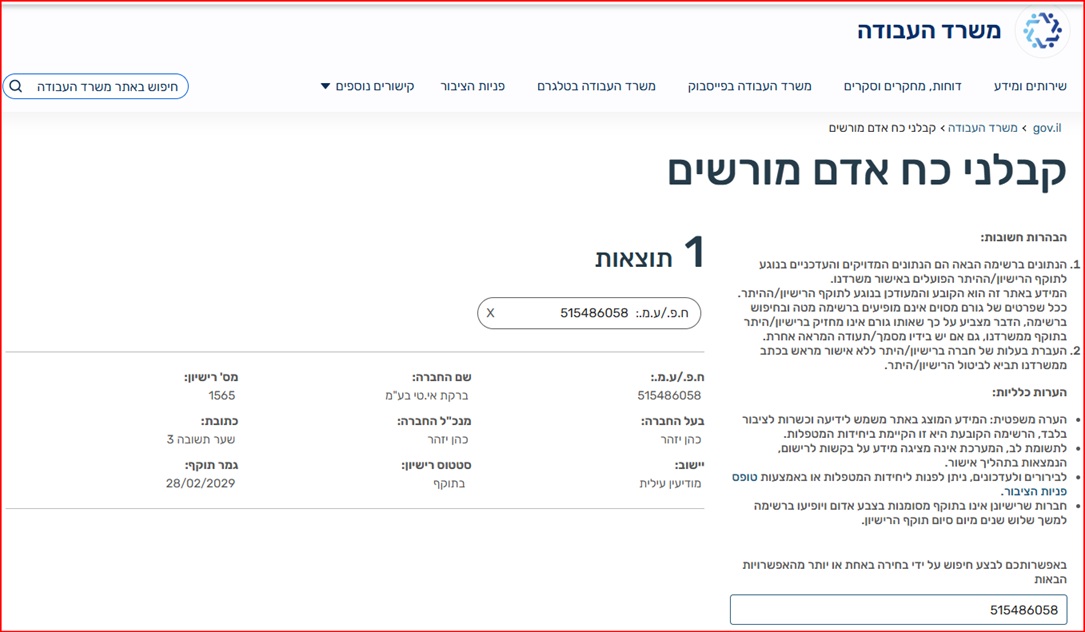
Closing an Israeli freelance or exempt dealer file is not automatic. VAT, Income Tax and National Insurance are handled separately, so each file must be closed or updated on its own and every closing confirmation kept. Closing makes sense when activity is occasional or the cost of a business file outweighs the income. Once the file is closed, you can still accept work through a compliant route · payroll, reopening the file, or NETO, where the client receives an invoice and you receive a payslip and net salary for a fee of 5% of the client invoice. NETO operates under manpower contractor license 1565 (Bareket I.T Ltd, company id 515486058).
When should you consider closing the file?
Closing makes sense when your freelance activity is no longer steady, income is rare or small, and the cost of maintaining a business file is higher than the value it creates. This is common for employees with side income, students, early-stage freelancers, or professionals who moved back to employment but still receive occasional projects.
If monthly freelance work is expected, keeping the file may still be right. If work is sporadic, NETO can provide a cleaner route: the client receives an invoice, while you avoid running an active business file. For example, if you opened an exempt dealer file for a few projects but now receive only two small jobs a year, NETO can let the client receive an invoice while you are paid as salary · with a proper payslip instead of a private invoice.

Close the file, then keep getting paid · in five steps
With NETO, the client receives an invoice from NETO while you receive a payslip and net salary. NETO handles tax withholding, National Insurance and the relevant contributions, so the payment is treated as salary rather than self-managed business income.
- Decide whether closing makes sense. Review your activity. Closing usually fits when freelance work is occasional, income is small, or the cost of keeping a business file open is higher than the value it creates.
- Close each authority separately. Submit a request to VAT, Income Tax and National Insurance one by one · they do not close together · and keep every closing confirmation and final report.
- Register with NETO. Set up a compliant payment route so you are ready for any occasional work that arrives after the file is closed.
- The client receives an invoice from NETO. When a project comes in, the client is billed with a proper invoice from NETO · no active business file is needed on your side.
- You receive a payslip and net salary. NETO withholds income tax, pays National Insurance and the relevant contributions, and pays you as salary, for a fee of 5% of the client invoice. This suits consulting, design, teaching, writing, development, translation, events or any occasional service.
Keeping the business file vs getting paid through NETO
The same goal · getting paid for occasional work legally · reached two very different ways.
| What it takes | Keeping an active file | With NETO |
|---|---|---|
| Business file | Stays open across VAT, Income Tax and National Insurance | None · no active file to run |
| Monthly reporting | Ongoing reports even in quiet months | None · you are paid as salary |
| Accounting cost | Accountant retained year-round | Only a fee when there is work |
| Client billing | You issue the invoice yourself | NETO issues the invoice |
| Your payment | Self-managed business income | Payslip and net salary |
| Cost model | Fixed overhead regardless of income | 5% of the client invoice |
Not sure which route fits? Compare the options in the invoice vs payslip guide, or read about alternatives to opening a business.
A licensed, documented payment route · not an undocumented shortcut
Licensed and supervised
NETO operates in Israel through Bareket I.T Ltd (company id 515486058) under manpower contractor license 1565, issued by the Ministry of Labor. For freelancers this supports a documented payment route, subject to reviewing the actual work relationship, tax position and required documents before work begins.
- License 1565 · verifiable in the state database
- Bank guarantees deposited at the Ministry of Labor
- Operating since 2016 as an employment platform
Clean and transparent
NETO is a digital employment platform · not a slow, high-overhead agency. Invoicing, payslips, withholding and reporting run through one automated system, so the payment is treated as salary with clean documentation rather than an undocumented cash payment.
- Fee of 5% of the client invoice · you pay only when there is work
- A proper payslip · tax and National Insurance handled
- No active file, no year-round accountant
You can verify NETO's license directly in the Ministry of Labor's manpower contractor database · a public register of every licensed manpower company in Israel.
Checklist · before, during and after closure
Before filing. Check open invoices, unpaid advances and any missing reports, so nothing is left hanging when the file closes.
During closure. Submit a request to each authority · VAT, Income Tax and National Insurance · and keep every confirmation number and final report.
After closure. Do not accept undocumented payments. For new work, use payroll, reopen the file, or route the payment through NETO so the client gets an invoice and you get a payslip. Read more on reporting occasional work.

Watch · how NETO works
A two-minute walkthrough · from signup to a legal payslip.
Closing a freelance file · questions and answers
Does closing the VAT file also close National Insurance?
Can I receive payment after closing my freelance file?
Will I still need a final report after closing?
When does NETO make sense instead of keeping a file open?
How much does NETO cost?
Is getting paid through NETO legal in Israel?
Should I keep my old accounting records?
Close the file and still get paid legally
Sign up for free and NETO gives you a compliant payment route · the client receives an invoice, you receive a payslip and net salary, for a fee of 5% of the client invoice with no active file to run. Operating since 2016 under manpower contractor license 1565, with guarantees deposited at the Ministry of Labor.
In summary
Closing a freelance file in Israel should be handled through a compliant, documented payment route. Close VAT, Income Tax and National Insurance separately, keep every confirmation, and do not accept undocumented payments afterwards. When the work no longer justifies a business file, NETO connects the client's need for an invoice with your need for net salary and clean documentation · one fee of 5% of the client invoice, no active file, and a proper payslip. NETO has operated since 2016 under manpower contractor license 1565 (Bareket I.T Ltd, company id 515486058).
- Not automatic · VAT, Income Tax and National Insurance close separately.
- Keep proof · save closing confirmations, final reports and clearance documents.
- Stay compliant · for new work use payroll, a reopened file, or NETO.
- Client gets an invoice · you get a payslip and net salary through NETO.
- Fully licensed · license 1565, supervised by the Ministry of Labor.
- One transparent fee · 5% of the client invoice, only when there is work.
Related guides for freelancers

Invoice vs payslip in Israel
Compare the payment routes and how each one is treated for employment.
Invoice vs Payslip in Israel – The DifferenceSide income for employees
How salaried employees handle occasional freelance income the right way.
Side income for employees
Freelancing while employed
Keeping a job and taking projects on the side · what is allowed and how.
FreelancingReporting occasional work
Documentation and reporting basics for one-off and irregular jobs.
Reporting occasional workTax on additional income
Tax coordination, National Insurance and what lands in your pocket.
Tax on additional incomePrivate invoice without a business
What is possible without opening a file, and what to avoid.
Private invoiceAlternatives to opening a business
Legal routes to get paid before you open a tax file at all.
Alternatives to opening a