Invoice for a foreign client without VATYou provide services to an overseas company · NETO issues a legal, VAT-exempt invoice to your foreign client in 5 minutes, with no business file to open
Are you an Israeli worker providing services to an overseas company? NETO lets you issue a legal, VAT-exempt invoice to your foreign client in 5 minutes · no business registration required, fully legal, licensed staffing company 1565. You keep the client relationship and the work · NETO handles the invoice, the payslip and the compliance.

AI summary · Invoice for a foreign client without VATClick to read the page summary
This page explains how an Israeli worker can issue a legal invoice to a foreign client through NETO in about five minutes, with no business file to open. In qualifying cases under Israeli VAT Law, the invoice can be VAT-exempt (0% VAT) for export of services · this is not automatic and each case must be assessed separately. NETO acts as a licensed staffing company (license 1565, Bareket I.T Ltd, company id 515486058), issues the invoice in English and, after the client pays, transfers your payment as a payslip with full employee rights. Pricing is transparent · a single fee of 5% of the invoice. For invoicing several clients or the broader picture, see the guide to Invoicing multiple foreign clients from Israel.
Issue a single invoice to a foreign client · the focused how-to
You found an overseas company that wants to pay you for your work, but you do not have a business file · or you would rather not open one just for a client abroad. NETO solves it: as a licensed staffing company, NETO issues the invoice to your foreign client on your behalf, in English, and pays you as an employee once the client settles the invoice.
This page is the focused how-to for issuing one VAT-exempt invoice to a foreign client. If you work with several overseas clients or want the wider legal and tax picture, the broader guide to Invoicing multiple foreign clients from Israel is the place to start · this how-to is a neighboring, single-invoice angle within the same topic.
When you invoice a foreign client · is VAT charged?
Under Israeli tax law, every invoice issued in Israel is subject to 18% VAT · unless the work was done by an Israeli resident for a foreign client with no branch and not registered with Israeli tax authorities. In that case: 0% VAT may apply · subject to specific conditions under Israeli VAT Law. Please note: Zero-rate VAT (0% VAT) is permitted only under very specific circumstances defined in Israeli VAT Law, and is not automatic. Each case must be individually assessed based on the exact legal conditions, the nature of the service, and the client's legal status. Compliance with all requirements is the full responsibility of the service provider.
For the full framework on the zero rate, see the zero-VAT export of services guide, and for how the earnings are taxed see tax on foreign-client work from Israel.
Why issue the invoice through NETO
Everything a business file would give you for this invoice · without opening one. NETO turns a foreign-client invoice into a five-minute service.
No business file
No self-employed registration, no bookkeeping and no accountant. NETO is already set up as a licensed staffing company and issues the invoice on your behalf.
Issued in English
The invoice goes to your foreign client automatically in English, in USD, EUR, GBP or another major currency · ready to send the moment you confirm.
VAT handled correctly
Where the qualifying conditions under Israeli VAT Law are met, the invoice can be VAT-exempt as export of services · assessed case by case, not applied automatically.
Ready in 5 minutes
Register, enter the client and transaction details, review the salary simulation and confirm. There is no entity to build, so the invoice is ready straight away.
Full employee rights
After the client pays, NETO transfers your payment as a payslip with pension, National Insurance and vacation pay · full rights under the law.
One transparent fee
A single fee of 5% of the invoice · no setup cost and no monthly subscription. You pay only when the client pays you.
From work done to invoice sent · in five steps
A simple, repeatable path. You handle the work and the relationship with your foreign client · NETO handles everything that makes the invoice legal.
- Register as a NETO freelancer. Create a free account. No business registration and no accountant required · it takes a couple of minutes.
- Fill in Form 101. Complete Form 101, and if you wish, arrange tax coordination inside the system at no cost.
- Issue the invoice. Enter your foreign client details, the transaction details and the invoice amount. NETO prepares the invoice in English.
- Receive a salary simulation. See the gross amount, the deductions and the net amount before you commit.
- Confirm and send. Confirm and the invoice is sent to your client automatically in English. Once the client pays, NETO transfers your payment as a payslip.
Opening your own business file vs invoicing through NETO
The same goal · a legal invoice to your foreign client · reached two very different ways.
| What it takes | Opening your own business file | Invoicing through NETO |
|---|---|---|
| Business registration | Register as self-employed and open files | None · NETO issues on your behalf |
| Invoice in English | Set up your own template and process | Issued automatically in English |
| VAT handling | You file and manage VAT yourself | 0% VAT where the conditions are met |
| Employee rights | None as self-employed | Payslip · pension and National Insurance |
| Time to first invoice | Days of setup and paperwork | About 5 minutes |
| Cost model | Accountant plus fixed overhead | 5% of the invoice |
Working with more than one overseas client? The broader guide to invoicing multiple foreign clients from Israel covers the wider setup, and issuing an international invoice from Israel walks through the mechanics.
Transparent pricing · only 5%
No hidden fees. No monthly subscription. Pay only when you get paid.
Service fee
A single fee on the invoice · nothing else to pay.
Example · a 1,000 dollar invoice
Invoice: $1,000
NETO fee (5%): $50
Goes to payroll: $950
Example · a 5,000 dollar invoice
Invoice: $5,000
NETO fee (5%): $250
Goes to payroll: $4,750
This is not your take-home pay. The employer's share (employer national insurance, a 6.5% pension contribution and 8.33% severance) is paid out of this amount, and income tax, national insurance and your 6% pension contribution are deducted on the payslip. The pension and severance build up in your name. Estimate: the net on an actual payslip is usually slightly higher, because the gross includes monthly advance payments for vacation, sick days, holidays and recuperation pay.
A licensed, secure route · not just a template
Licensed and supervised
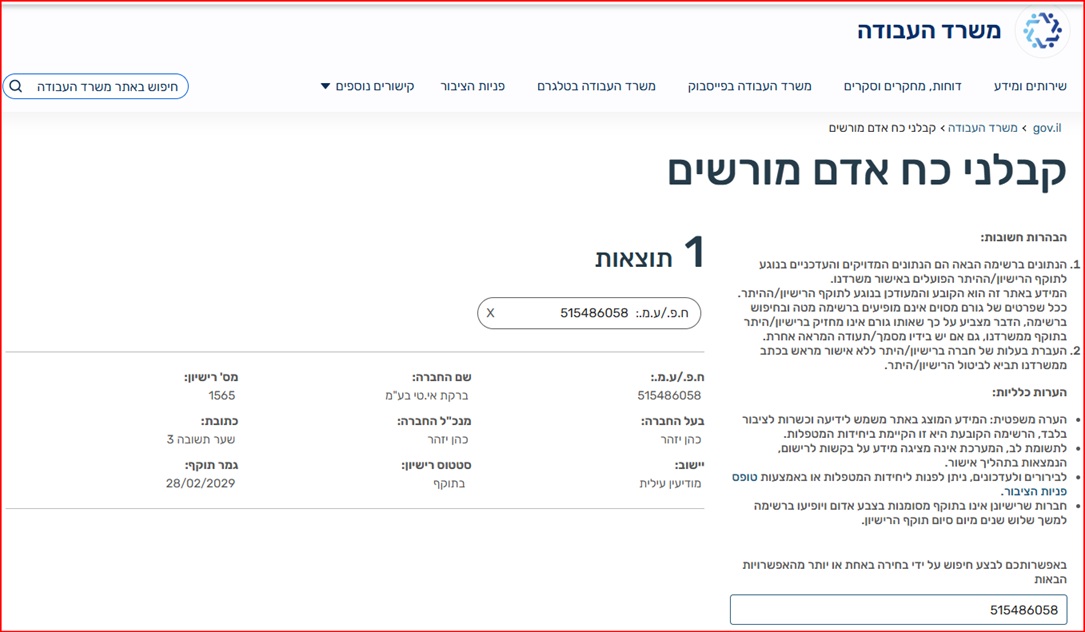
NETO operates lawfully through Bareket I.T Ltd (company id 515486058) under manpower contractor license 1565, supervised by the Ministry of Labor, with guarantees deposited against workers' wages.
- License 1565 · verifiable in the state database
- Bank guarantees securing the worker's pay
- Operating since 2016 as an employment platform
Automated and transparent
NETO is a digital employment platform · not a slow, high-overhead agency. Invoices, payslips, tax coordination and payments run through one automated system, so the process is fast, available and fully visible.
- A single 5% fee on the invoice · far below a classic agency
- Salary simulation before you confirm
- Full statutory rights on the payment you receive
You can verify NETO's license directly in the Ministry of Labor's manpower contractor register · the public list of every licensed manpower company in Israel.
Israeli freelancers invoicing global clients
"Issued my first invoice to a US client in 5 minutes. No accountant, fully legal."
Barak Barkai
"As a designer working with European clients, NETO solved my invoicing problem. The 5% fee is worth every cent."
Romi Oren
"I get a payslip, pension contributions, and employee rights · while working for my German client."
Yuval Adani
"The tax simulator showed me exactly what I would earn · I confirmed and the invoice was sent to my client instantly."
Eliav T.
Watch · how it works
Two minutes that show the whole model, start to finish.
Invoicing a foreign client · questions and answers
Can I issue a foreign client invoice without opening a business file?
Is it fully legal?
Does 0% VAT always apply on a foreign client invoice?
How much does NETO charge?
What currencies are supported?
What employee rights do I receive?
How long does it take to issue the invoice?
Can I invoice more than one foreign client?
Ready to invoice your foreign client?
Sign up for free and NETO issues the invoice to your foreign client in English, VAT-exempt where the conditions apply, for a single 5% fee with no business file to open. Operating since 2016 under manpower contractor license 1565, with guarantees deposited at the Ministry of Labor.
In summary
You can invoice a foreign client without ever opening a business file. NETO acts as a licensed staffing company: it issues the invoice to your overseas client in English, and where the qualifying conditions under Israeli VAT Law are met the invoice is VAT-exempt as export of services. After the client pays, you receive a payslip with full employee rights. It is fast, lawful and low-hassle · about five minutes, a single 5% fee on the invoice, and no company to build. NETO has operated since 2016 under manpower contractor license 1565 (Bareket I.T Ltd, company id 515486058).
- No business file · NETO issues the invoice on your behalf.
- Issued in English · USD, EUR, GBP and other major currencies.
- VAT-exempt where it applies · 0% for qualifying export of services.
- Ready in 5 minutes · register, simulate, confirm, send.
- Full employee rights · pension, National Insurance and vacation pay.
- One transparent fee · 5% of the invoice, paid only when you are paid.
Related guides for freelancers

Invoicing multiple foreign clients from Israel
The broader pillar guide · setup, VAT and tax for working with several overseas clients.
Read the guide
English invoice for a foreign client
How the invoice is issued in English and sent to your overseas client automatically.
Read the guide
Tax on foreign-client work from Israel
How income from overseas clients is taxed and reported when you work through NETO.
Read the guideInternational invoice from Israel
The mechanics of issuing an international invoice from Israel, step by step.
Read the guideZero-VAT export of services guide
When the 0% rate applies to export of services · the conditions under Israeli VAT Law.
Read the guideRights of a worker in Israel
Pension, National Insurance and vacation pay · the rights on the payslip you receive.
Read the guide